
Work orders from request to signed-off close-out.
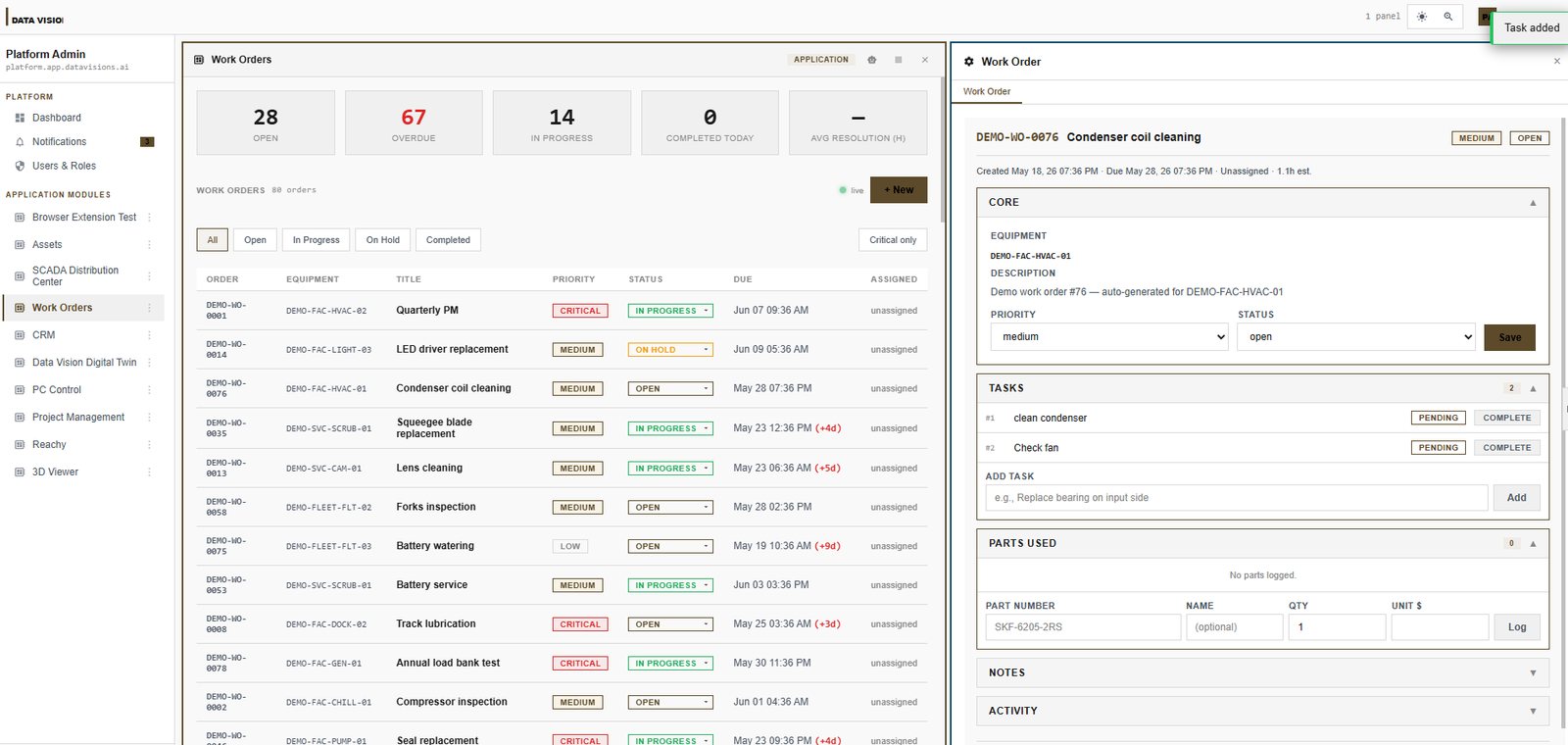
Paste a customer email and AI files the work order with its tasks and assignee. Technicians see only what is theirs, log their time and parts, and every order closes through the approvals you set.
Built for the work, not the paperwork.
Requests become orders in one step
Paste an email or a note and the AI planner fills in the title, tasks and assignee. People can also file a request from a Windows tray app without opening a browser.
A clear list for every technician
My Work shows each technician exactly what is assigned to them. Leads can assign, prioritize, add notes or post time on many orders at once.
Labor and materials on every job
Time and parts are logged against the order as the work happens, with internal notes the requester never sees.
Approvals and a full history
Request types carry named approvers, and every order keeps an activity trail of who changed what and when.
Tied to your equipment
Add the Assets or Equipment & Tools modules and every work order lands on the machine's own history.
Inspections in the field
With Inspections & Forms, crews run checklists on the phone, and a failed equipment check opens a repair on that unit.
Start with one. They share their data.
Each module installs into your workspace on its own and works with the others, so a customer, a job or a machine is entered once.
 Projects & field work
Work Orders
From request to approved close-out, with an AI planner that files work orders from an email.
 Assets & IT
Assets
One registry for every machine and piece of equipment, with its full history.
 Assets & IT
Equipment & Tools
Every vehicle, trailer, machine and tool, and where each one is right now.
 Projects & field work
Inspections & Forms
Build any form once and fill it on the web or the DV Field phone app.
 Assets & IT
Runbooks
Your company how-to library, walked through step by step.
Before you start.
Who is it for?
Maintenance, facilities and field service teams that take requests from customers or other departments and need to show the work was done.
Do technicians need a computer?
No. They work from a phone or tablet in the browser, and inspections and daily reports run in the DV Field phone app.
How is it priced?
By workspace capacity, not per user, so adding technicians does not add seat fees. Marketplace modules are priced by subscription.
Can it change to fit how we work?
Yes. Describe what is missing and AI builds it on the platform, or our team builds it for you.
Also see landscaping software, inspection & forms app, equipment tracking software, job costing software, preventive maintenance software, employee onboarding software and takeoff software.
Build the software your business runs on. Start today.
Start from ready-made modules, describe what is missing and let AI build it, or have our team deliver it end to end through the Success Program.