
Agent Designer
Build Intelligent AI Workflows — Visually, Powerfully, Effortlessly
Visual AI Development
From Concept to Production in Minutes
The Agent Designer transforms complex AI orchestration into an intuitive visual experience. Connect nodes, configure behaviors, and deploy intelligent workflows—all without writing a single line of code.
Visual Canvas
Drag-and-drop node placement with visual edge connections. Auto-layout and zoom controls make even complex workflows easy to understand.
Real-Time Streaming
Server-Sent Events deliver live execution updates. Watch your agents think, call tools, and respond—all in real-time as it happens.
Human-in-the-Loop
Pause workflows for human review with dynamic form collection. 32 form components let you capture any data your process needs.
Enterprise Ready
API publishing, scheduled execution, rate limiting, and full execution tracing. Production-grade features from day one.
Design Once. Deploy Anywhere. Scale Infinitely.
Whether you're building a customer service chatbot, an automated data pipeline, or a multi-step approval workflow—the Agent Designer gives you the power to create, test, and deploy intelligent automation that grows with your business.
Platform Capabilities
Everything you need to build, test, and deploy intelligent AI workflows at enterprise scale.
Conditional Logic
Route execution based on conditions with binary branching or AI-powered intelligent routing decisions.
Parallel Execution
Fan-out to multiple agents simultaneously and fan-in results. Process complex tasks in parallel for faster completion.
Media Generation
Generate images, videos, and audio directly in your workflows. Supports DALL-E, Imagen, Veo, and more.
API Publishing
Publish workflows as REST APIs with authentication, rate limiting, and usage tracking built in.
Scheduled Runs
Automate workflow execution with cron expressions or intervals. Each schedule can have its own trigger prompt.
Execution Tracing
Full visibility into every execution with tool call details, token usage, timing, and performance metrics.
Node Library (11 Types)
The Node Library provides 11 node types organized into categories. Each node type has specific configuration options and connection rules.
Intelligent Execution
Watch Your Workflows Come to Life
Real-time streaming delivers every thought, action, and response as it happens. Enterprise-grade memory management keeps conversations coherent across any length.
Real-Time Streaming
Server-Sent Events deliver live updates as each node processes. See thinking, tool calls, and responses in real-time—not after the fact.
-
thinking- Agent reasoning in progress -
tool_call- Tool execution started -
response- Streamed text output -
paused- Awaiting human input -
complete- Workflow finished
Full Observability
Complete visibility into every execution. Debug issues, optimize performance, and understand exactly what your agents are doing.
- Trace Viewer with node-by-node inspection
- Token usage tracking (input/output)
- Execution history with full logs
- Error handling with automatic retries
- Cancel support for running workflows
Human-in-the-Loop Forms
The command center for bridging AI automation with human decision-making
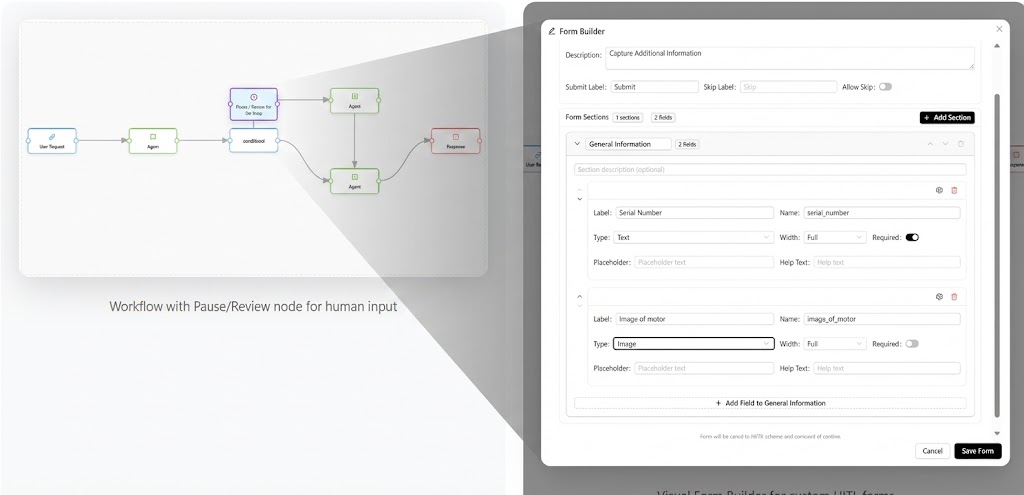
Workflow with Pause/Review node and visual Form Builder
Build at the Speed of Thought
Our AI Form Builder understands plain English. Type "Create a 3-step onboarding wizard with file uploads" and get a production-ready interface instantly.
Seamless DataHub Integration
Forms are natively bound to your DataHub tables. Every submission is validated against your schema and synced to your database in real-time.
Intelligent Logic
Conditional visibility, computed formulas, and event-driven actions create "living" forms that respond dynamically to user input.
32+ Components
From digital signatures to file uploads, repeating groups to data grids—everything you need to capture complex data is built in.
Forms That Think. Workflows That Flow.
Expose any form as an AI tool for agent pre-fill. Organize complex apps into modular form sets. Save version checkpoints and restore instantly. The Form Designer transforms how you build human-AI collaboration.
Deploy & Scale
Take your workflows from design to production. Publish as APIs, schedule automated runs, and monitor everything in real-time.
API Publishing
Each workflow gets a unique REST endpoint with authentication, rate limiting, versioning, and CORS configuration built in.
Scheduled Execution
Automate with cron expressions, intervals, or one-time runs. Each schedule can have its own trigger prompt and execution logs.
Usage Analytics
Track API calls, token consumption, execution times, and error rates. Understand how your workflows perform at scale.
Enterprise Security
API key authentication, rate limiting per key, IP allowlisting, and audit logs for every request.
API Endpoints
GET /streaming/execute/<uuid> Execute with SSE streamingPOST /streaming/execute/<uuid>/resume Resume paused workflowGET /api/workflows/<uuid>/status Check execution status
Ready to Build?
Start creating intelligent AI workflows in minutes with our visual designer.